






 家庭菜園でいろいろ育てているのですが、
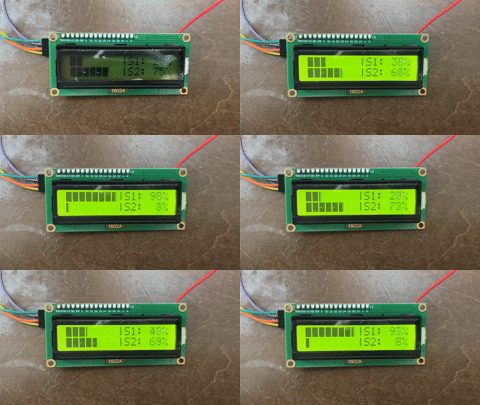

#include <Wire.h>

#include <LiquidCrystal_I2C.h>

#include <EEPROM.h>


// ===== Demo mode =====

// Uncomment to enable LCD demo (no sensor read / no calibration)

 #define DEMO_MODE


// ===== Pins =====

#define PIN_BL   5   // PWM backlight

#define PIN_SW1  4   // Brightness button

#define PIN_SW2  7   // Cal button (hold 5s to enter, short press to proceed)


#define PIN_S1   A0  // Top sensor

#define PIN_S2   A1  // Bottom sensor


LiquidCrystal_I2C lcd(0x27, 16, 2);


// ---- Normal mode

unsigned long lastNormalUpdateMs = 0;

const unsigned long NORMAL_UPDATE_MS = 500;


#ifdef DEMO_MODE

// 0→100 in 5s (1% per step): 5,000ms / 100steps = 50ms

const unsigned long DEMO_STEP_MS = 50;

unsigned long demoLastMs = 0;

int16_t demoPct = 0;      // 0..100

bool demoSwap = false;   // false: S1 up / S2 down, true: swapped

#endif


// 1/5~5/5(横方向に塗る)。各行同じパターンでOK(5x8)

byte BAR_1_5[8] = { B10000,B10000,B10000,B10000,B10000,B10000,B10000,B10000 };

byte BAR_2_5[8] = { B11000,B11000,B11000,B11000,B11000,B11000,B11000,B11000 };

byte BAR_3_5[8] = { B11100,B11100,B11100,B11100,B11100,B11100,B11100,B11100 };

byte BAR_4_5[8] = { B11110,B11110,B11110,B11110,B11110,B11110,B11110,B11110 };

byte BAR_5_5[8] = { B11111,B11111,B11111,B11111,B11111,B11111,B11111,B11111 };


// 1..5 を「lcdのカスタム文字番号」に変換(0..4 を使う)

static inline uint8_t barCharIndex(uint8_t level1to5) {

  return (uint8_t)(level1to5 - 1); // 1->0, 5->4

}


void initBarChars() {

  lcd.createChar(0, BAR_1_5);

  lcd.createChar(1, BAR_2_5);

  lcd.createChar(2, BAR_3_5);

  lcd.createChar(3, BAR_4_5);

  lcd.createChar(4, BAR_5_5);

}


// ===== Backlight levels =====

const uint8_t blTable[] = { 0, 32, 64, 128, 192, 255 };

const uint8_t BL_LEVELS = sizeof(blTable) / sizeof(blTable[0]);

uint8_t blIndex = 1; // 初期(お好みで): 32


// ===== EEPROM calibration data =====

struct CalPair {

  uint16_t dry1, wet1;   // Sensor1: dry/wet

  uint16_t dry2, wet2;   // Sensor2: dry/wet

  uint16_t magic;

};

static const uint16_t CAL_MAGIC = 0xA55A;

static const int EEPROM_ADDR = 0;


CalPair cal;


// ===== Simple button debouncer / edge detector =====

struct Button {

  uint8_t pin;

  bool stable;      // stable level (HIGH/LOW)

  bool lastRead;

  unsigned long lastChangeMs;


  bool prevStable;  // for edge detect


  void begin(uint8_t p) {

    pin = p;

    stable = HIGH;

    lastRead = HIGH;

    prevStable = HIGH;

    lastChangeMs = 0;

  }


  // returns stable level

  bool update(unsigned long nowMs, unsigned long debounceMs = 30) {

    bool r = digitalRead(pin);

    if (r != lastRead) {

      lastRead = r;

      lastChangeMs = nowMs;

    }

    if (nowMs - lastChangeMs >= debounceMs) {

      stable = lastRead;

    }

    return stable;

  }


  bool pressedEdge() {   // HIGH -> LOW

    bool ev = (prevStable == HIGH && stable == LOW);

    prevStable = stable;

    return ev;

  }


  bool releasedEdge() {  // LOW -> HIGH

    bool ev = (prevStable == LOW && stable == HIGH);

    prevStable = stable;

    return ev;

  }

};


Button btnBL;

Button btnCAL;


// 0%: dry, 100%: wet

// wetよりさらに濡れて raw が下がると 100%超えを返す

long moisturePercentOver(uint16_t raw, uint16_t dry, uint16_t wet) {

  long denom = (long)dry - (long)wet;   // 通常は正

  if (denom == 0) return 0;             // 異常防止


  long num = ((long)dry - (long)raw) * 100L;


  // 四捨五入(denomが正の想定)

  long pct = (num + denom / 2) / denom;


  // 乾燥側は 0%未満を丸める(あなたの要件)

  if (pct < 0) pct = 0;


  return pct; // 上限はあえて丸めない(>100%OK)

}


// ===== Analog read helpers =====

uint16_t readAnalogAvg(uint8_t pin, uint8_t n = 16) {

  uint32_t sum = 0;

  for (uint8_t i = 0; i < n; i++) {

    sum += (uint16_t)analogRead(pin);

    delay(1);

  }

  return (uint16_t)((sum + (n / 2)) / n);

}


// ===== LCD helpers =====

void lcdLine(uint8_t row, const char* s) {

  lcd.setCursor(0, row);

  lcd.print("                "); // clear row (16 spaces)

  lcd.setCursor(0, row);

  lcd.print(s);

}


// "S1:1023 S2: 456" みたいに収める

void lcdS1S2(uint16_t s1, uint16_t s2) {

  lcd.setCursor(0, 1);

  lcd.print("S1:");

  lcd.print(s1);

  lcd.print(" S2:");

  lcd.print(s2);

  // 桁残り対策(最後を空白で埋める)

  int used = 3 + (s1 >= 1000 ? 4 : s1 >= 100 ? 3 : s1 >= 10 ? 2 : 1) + 4 + (s2 >= 1000 ? 4 : s2 >= 100 ? 3 : s2 >= 10 ? 2 : 1);

  for (int i = used; i < 16; i++) lcd.print(" ");

}


// pct: 0..∞ を想定。バーは 0..100 にクリップして表示。

// width=8 のバーを作る

void makeBar8(long pct, char out[9]) {

  if (pct < 0) pct = 0;

  if (pct > 100) pct = 100;


  // 0..100 を 0..8 に変換(四捨五入)

  // 例: 50% -> 4本

  long filled = (pct * 8 + 50) / 100; // 0..8


  for (int i = 0; i < 8; i++) out[i] = (i < filled) ? 'X' : ' ';

  out[8] = '\0';

}


// "BAR|S1:100%" を1行分作る(必ず16文字に収まる)

void makeLine(char sensorLabel, long pct, char line[17]) {

  char bar[9];

  makeBar8(pct, bar);


  // %は999まで表示(見た目だけ)

  if (pct > 999) pct = 999;


  // 右側は固定幅にしてズレないように "%3ld" を使う

  // 例: "S1: 50%" / "S1:100%" / "S1:  0%"

  snprintf(line, 17, "%s|S%c:%3ld%%", bar, sensorLabel, pct);

}


void drawBarPercent(uint8_t row, long pct, char sensorLabel) {

  // 表示用バーは0..100にクリップ

  long barPct = pct;

  if (barPct < 0) barPct = 0;

  if (barPct > 100) barPct = 100;


  // 0..100% -> 0..40 (8セル×5段) に変換(四捨五入)

  // 検算:100% -> (100*40+50)/100 = 40

  //      0%   -> 0

  uint8_t units40 = (uint8_t)((barPct * 40L + 50L) / 100L); // 0..40


  lcd.setCursor(0, row);


  // 左8セル描画:各セルは0..5段

  for (uint8_t i = 0; i < 8; i++) {

    int16_t remain = (int16_t)units40 - (int16_t)(i * 5); // このセルに割り当てる残り

    uint8_t level; // 0..5

    if (remain <= 0) level = 0;

    else if (remain >= 5) level = 5;

    else level = (uint8_t)remain;


    if (level == 0) lcd.print(' ');

    else            lcd.write(barCharIndex(level)); // 1..5 -> 0..4

  }


  lcd.print('|');


  // 右側表示(見た目制限は従来通り)

  if (pct < 0) pct = 0;

  if (pct > 999) pct = 999;


  char buf[8];

  snprintf(buf, sizeof(buf), "S%c:%3ld%%", sensorLabel, pct);

  lcd.print(buf);

}


#ifdef DEMO_MODE

void demoUpdate() {

  unsigned long now = millis();


  // first draw immediately

  if (demoLastMs == 0) {

    demoLastMs = now;

  } else {

    if (now - demoLastMs < DEMO_STEP_MS) return;

    demoLastMs = now;

    demoPct++;

    if (demoPct > 100) {

      demoPct = 0;

      demoSwap = !demoSwap;

    }

  }


  long pS1 = demoSwap ? (100 - demoPct) : demoPct;

  long pS2 = demoSwap ? demoPct : (100 - demoPct);


  drawBarPercent(0, pS1, '1');

  drawBarPercent(1, pS2, '2');

}

#endif


// ===== EEPROM =====

bool loadCalFromEEPROM() {

  CalPair tmp;

  EEPROM.get(EEPROM_ADDR, tmp);

  if (tmp.magic == CAL_MAGIC) {

    cal = tmp;

    return true;

  }

  return false;

}


void saveCalToEEPROM() {

  cal.magic = CAL_MAGIC;

  EEPROM.put(EEPROM_ADDR, cal);

}


// ===== Calibration state machine =====

enum Mode {

  MODE_NORMAL = 0,

  MODE_CAL_WAIT_RELEASE,  // 5秒長押し後、離すのを待つ

  MODE_CAL_DRY,       // capture dry

  MODE_CAL_WET,       // capture wet

  MODE_CAL_CONFIRM,   // show summary, press to save

  MODE_CAL_SAVED      // saved, press to exit

};


Mode mode = MODE_NORMAL;


unsigned long calHoldStartMs = 0;

bool calHoldArmed = false;


unsigned long lastLiveUpdateMs = 0;

const unsigned long LIVE_UPDATE_MS = 200;


// for confirm paging

unsigned long confirmPageStartMs = 0;

bool confirmPageAlt = false; // false: show S1, true: show S2


// ===== Apply backlight =====

void applyBacklight() {

  analogWrite(PIN_BL, blTable[blIndex]);

}


// ===== Setup =====

void setup() {

  pinMode(PIN_BL, OUTPUT);


  pinMode(PIN_SW1, INPUT_PULLUP);

  pinMode(PIN_SW2, INPUT_PULLUP);


  btnBL.begin(PIN_SW1);

  btnCAL.begin(PIN_SW2);


  Wire.begin();

  lcd.init();

  lcd.backlight();

  initBarChars();


  applyBacklight();


  bool ok = loadCalFromEEPROM();

  if (ok) {

    lcdLine(0, "Normal (Cal OK)");

  } else {

    lcdLine(0, "Normal (No Cal)");

  }

  lcdLine(1, "Hold D7=Cal  ");

}


// ===== Loop =====

void loop() {

#ifdef DEMO_MODE

  demoUpdate();

  return;

#endif


  unsigned long now = millis();


  // ---- update buttons ----

  btnBL.update(now);

  btnCAL.update(now);


  // ---- Backlight button (D4): cycle brightness, no message ----

  if (btnBL.pressedEdge()) {

    blIndex = (uint8_t)((blIndex + 1) % BL_LEVELS);

    applyBacklight();

  }


  // ---- Calibration button (D7): hold 5s to enter, short press to proceed ----

  // Enter calibration only from normal mode

  if (mode == MODE_NORMAL) {

    if (btnCAL.stable == LOW) {

      if (!calHoldArmed) {

        calHoldArmed = true;

        calHoldStartMs = now;

      } else {

        if (now - calHoldStartMs >= 5000) {

          // いきなりDRYへ行かない

          mode = MODE_CAL_WAIT_RELEASE;


          lcdLine(0, "Cal mode ready ");

          lcdLine(1, "Release D7     ");

        }

      }

    } else {

      calHoldArmed = false;

    }


    // ---- Normal mode display: show S1/S2 as percent ----

    if (now - lastNormalUpdateMs >= NORMAL_UPDATE_MS) {

      lastNormalUpdateMs = now;


      uint16_t raw1 = readAnalogAvg(PIN_S1, 16);

      uint16_t raw2 = readAnalogAvg(PIN_S2, 16);


      /*

      if (cal.magic == CAL_MAGIC) {

        long p1 = moisturePercentOver(raw1, cal.dry1, cal.wet1);

        long p2 = moisturePercentOver(raw2, cal.dry2, cal.wet2);


        char line0[17], line1[17];

        makeLine('1', p1, line0);  // "XXXXXXXX|S1:100%"

        makeLine('2', p2, line1);  // "XXXXXXXX|S2:100%"


        lcdLine(0, line0);

        lcdLine(1, line1);

      } else {

        lcdLine(0, "No Cal          ");

        lcdLine(1, "Hold D7=Cal     ");

      }

    }

    */

      if (cal.magic == CAL_MAGIC) {

        long p1 = moisturePercentOver(raw1, cal.dry1, cal.wet1);

        long p2 = moisturePercentOver(raw2, cal.dry2, cal.wet2);


        drawBarPercent(0, p1, '1'); // 1行目:バー|S1:xxx%

        drawBarPercent(1, p2, '2'); // 2行目:バー|S2:xxx%

      } else {

          lcdLine(0, "No Cal          ");

          lcdLine(1, "Hold D7=Cal     ");

      }

    }


    return;

  }


  // ---- In calibration: handle wait-release first ----

  if (mode == MODE_CAL_WAIT_RELEASE) {

    // 離すまで待つ

    if (btnCAL.stable == HIGH) {

      mode = MODE_CAL_DRY;

      lastLiveUpdateMs = 0;


      lcdLine(0, "Cal: DRY point");

      lcdLine(1, "Prep, press D7");

    }

    return; // ここ重要:このモード中は他処理しない

  }


  // ---- In calibration: live read + step on short press ----

  // live update (except MODE_CAL_SAVED can be static)

  if (mode == MODE_CAL_DRY || mode == MODE_CAL_WET) {

    if (now - lastLiveUpdateMs >= LIVE_UPDATE_MS) {

      lastLiveUpdateMs = now;

      uint16_t s1 = readAnalogAvg(PIN_S1);

      uint16_t s2 = readAnalogAvg(PIN_S2);


      // 2行目はライブ値表示にする

      // DRY/WETの案内は1行目に短く保持

      lcdS1S2(s1, s2);

    }

  }


  // short press to proceed in calibration

  if (btnCAL.pressedEdge()) {

    switch (mode) {

      case MODE_CAL_DRY: {

        // capture dry for both sensors

        cal.dry1 = readAnalogAvg(PIN_S1, 32);

        cal.dry2 = readAnalogAvg(PIN_S2, 32);


        lcdLine(0, "Dry captured   ");

        lcdS1S2(cal.dry1, cal.dry2);

        delay(600);


        mode = MODE_CAL_WET;

        lastLiveUpdateMs = 0;

        lcdLine(0, "Cal: WET point ");

        lcdLine(1, "Prep, press D7");

        break;

      }


      case MODE_CAL_WET: {

        // capture wet for both sensors

        cal.wet1 = readAnalogAvg(PIN_S1, 32);

        cal.wet2 = readAnalogAvg(PIN_S2, 32);


        lcdLine(0, "Wet captured   ");

        lcdS1S2(cal.wet1, cal.wet2);

        delay(600);


        mode = MODE_CAL_CONFIRM;

        confirmPageStartMs = now;

        confirmPageAlt = false;


        // confirm画面へ

        lcdLine(0, "Save? Press D7 ");

        // 1行に収まらないのでページ切替表示

        // まずS1を表示

        {

          char buf[17];

          // "S1 999/999" 形式

          snprintf(buf, sizeof(buf), "S1 %u/%u", cal.dry1, cal.wet1);

          lcdLine(1, buf);

        }

        break;

      }


      case MODE_CAL_CONFIRM: {

        saveCalToEEPROM();

        mode = MODE_CAL_SAVED;


        lcdLine(0, "Saved EEPROM   ");

        lcdLine(1, "Press D7=Exit  ");

        break;

      }


      case MODE_CAL_SAVED: {

        mode = MODE_NORMAL;

        calHoldArmed = false;


        bool ok = (cal.magic == CAL_MAGIC);

        if (ok) lcdLine(0, "Normal (Cal OK)");

        else    lcdLine(0, "Normal (No Cal)");

        lcdLine(1, "Hold D7=Cal  ");

        break;

      }


      default:

        break;

    }

  }


  // confirm mode: auto toggle page every 1.2s (shows S1 then S2)

  if (mode == MODE_CAL_CONFIRM) {

    if (now - confirmPageStartMs >= 1200) {

      confirmPageStartMs = now;

      confirmPageAlt = !confirmPageAlt;


      if (!confirmPageAlt) {

        char buf[17];

        snprintf(buf, sizeof(buf), "S1 %u/%u", cal.dry1, cal.wet1);

        lcdLine(1, buf);

      } else {

        char buf[17];

        snprintf(buf, sizeof(buf), "S2 %u/%u", cal.dry2, cal.wet2);

        lcdLine(1, buf);

      }

    }

  }

}

/*
ボード : Arduino Nano (ATmega328P) 16MHz / LGT8F328P 32MHz 対応
表示 : SSD1306/SH1106 (I2C, SSD1306AsciiAvrI2c)
CAN : MCP2515 (mcp_can.h) 500kbps, CS=D9(配線に合わせる)
RTC : DS1307 (SQW=1Hz → D3/INT1)
ブザー : D10
機能概要:
- 1Hzクロックは「RTC優先」、途絶時はTimer1へ自動フォールバック。復帰で自動復帰。
- 画面表示は "xx\nRTC\nHR4" / "xx\nISR\nHR4" を自動切替(RTC/内部判定)
- 速度・回転数・ブレーキに応じてLED/ブザーを制御
* 速度LED:SPD_TH_GEN/HIを基準に、以下の演出
d = 現在速度 - 選択しきい値
d ∈ [-4,-2] 黄LED点灯
d ∈ [-1, 0] 赤LED点灯(黄は消灯)
d > 0 赤消灯(越えたら消灯)
d < -4 どちらも消灯
* 速度ビープ(ラッチ制御):
- 一般道(ラッチOFF時):SPD_TH_GEN-1 ~ SPD_TH_GEN の間だけビープ、超えたら無音
- 高速道(ラッチON時) :SPD_TH_HI+1 以上で連続ビープ
- ラッチON条件:一度でも SPD_TH_GEN を超えたらON。解除条件:30km/h以下に落ちたらOFF。
* 高速側到達ワンショット:SPD_TH_HIへ「加速で到達した瞬間のみ」0.4秒ビープ
* 回転数ビープ:
設定(0..99) → 1500..2500rpmにマッピング
閾値-200rpmで黄LED点滅、閾値到達で赤LED+ビープ(黄は消灯)
* ブレーキON時は赤LED優先
- セッティングメニュー:
ブレーキ N 回(実機5回/6秒以内, デバッグ3回/8秒以内)で突入
保存時にワンショットビープ
*/
#include
#include
#include
#include
#include "SSD1306AsciiAvrI2c.h"
#include
/* ====== デバッグモード切替 ====== */
//#define DEBUG_STUB //デバッグ時は有効化
#ifdef DEBUG_STUB
#define MENU_TOGGLE_COUNT 3 // デバッグ:3回
#define MENU_WINDOW_MS 8000 // デバッグ:8秒以内
#else
#define MENU_TOGGLE_COUNT 5 // 実機:5回
#define MENU_WINDOW_MS 6000 // 実機:6秒以内
#endif
/* ====== 設定デフォルト値 ====== */
#define DEF_SPEED_BEEP_ON 1 // 速度ビープ 初期値
#define DEF_RPM_BEEP_ON 1 // 回転数ビープ 初期値
#define DEF_LED_ON 1 // LED全体ON 初期値
#define DEF_SPEED_TH_GEN 60 // 一般道 しきい値
#define DEF_SPEED_TH_HI 95 // 高速道 しきい値
#define DEF_RPM_TH_0_99 45 // 0..99 → 1500..2500rpm
#define DEF_OLED_BRI_0_255 160 // OLED輝度 0..255
/* ====== オプション(必要に応じて) ====== */
// #define RTC_MODE // 固定RTCモード(通常は自動切替)
#define LED_H
#define RPM_LED_MODE
#define BRK_LED_MODE
#define KMH_LED_MODE
// OLEDコントローラ選択
#define OLED_IS_SH1106 // SH1106を使う場合に有効化
/* ====== ピン定義 ====== */
#define LED_RED 6
#define LED_YELLOW 5
#define BUZZER_PIN 10
#define CAN0_INT 2 // MCP2515 INT
MCP_CAN CAN0(9); // MCP2515 CS=D9
/* ====== バージョン表示用(RTC/ISRの切替表示) ====== */
const char ver_isr[] PROGMEM = "67C\nISR\nHR4";
const char ver_rtc[] PROGMEM = "67C\nRTC\nHR4";
char version[13];
/* ====== 1Hzクロック関連 ====== */
volatile bool WARIKOMI_1HZ = false;
volatile uint32_t last_ext_edge_ms = 0; // 外部1Hzの最後の立下り検出時刻
volatile bool use_internal_clock = true; // 起動直後は内部1Hz
volatile uint8_t ext_stable_cnt = 0;
const uint16_t EXT_MISS_MS = 1500; // この時間以上来なければ外部停止扱い
const uint8_t EXT_STABLE_MIN = 3; // 連続観測回数で安定判定
/* ====== CAN/計測値 ====== */
long unsigned int rxId;
unsigned char len = 0;
unsigned char rxBuf[8];
short int rpm = 0;
short int gas_pedal = 0; // 0..99
bool brk = 0;
bool ex_brk = 0;
int kmh = 0;
int kmh_old = 0;
int id_sw = 0;
#define TIME_OVER 2000
unsigned long timer_over = 0;
unsigned long timer_ref = 0;
/* ====== OLED関連 ====== */
#define OLED_ADDRESS 0x3C
SSD1306AsciiAvrI2c oled;
#define FLASH_RATE 800
#define REF_TIME 40
unsigned long timer_flash = 0;
bool monitor_SW = true;
bool monitor_SPEED = false;
bool flashFLG = false;
/* ====== 走行/停車ロジック ====== */
#define BLINK_INTERVAL 52
unsigned long timerBlink = 0;
bool blink_flg = 0;
#define H4 14400UL // 4時間
short int h4Timer = H4 - 1;
unsigned short int stopTimer= 0;
short int stopKakutei = 0;
short int stopKakutei_old = 0;
short int stopTimeBuf[3] = {0,0,0};
/* ====== 設定保存(EEPROM固定アドレス) ====== */
struct Settings430 {
// flags: bit0=SpeedBeep, bit1=RpmBeep, bit2=LedOn
uint8_t flags;
uint8_t spd_th_gen; // 一般道しきい値
uint8_t spd_th_hi; // 高速道しきい値
uint8_t rpm_th_0_99; // 0..99(1500..2500に換算)
uint8_t oled_bri; // 0..255
uint16_t crc;
};
#define FLG_SPEED_BEEP (1u<<0)
#define FLG_RPM_BEEP (1u<<1)
#define FLG_LED_ON (1u<<2)
static const int EE_ADDR = 0;
static Settings430 g_sets;
/* ====== CRC16-CCITT ====== */
static uint16_t crc16_ccitt(const uint8_t* d, size_t n){
uint16_t c=0xFFFF;
for(size_t i=0;i
for(uint8_t b=0;b<8;b++) c=(c&0x8000)?(c<<1)^0x1021:(c<<1);
}
return c;
}
/* ====== 設定 初期化/読み出し/保存 ====== */
static void setDefaults(){
g_sets.flags = (DEF_SPEED_BEEP_ON?FLG_SPEED_BEEP:0) | (DEF_RPM_BEEP_ON?FLG_RPM_BEEP:0) | (DEF_LED_ON?FLG_LED_ON:0);
g_sets.spd_th_gen = DEF_SPEED_TH_GEN;
g_sets.spd_th_hi = DEF_SPEED_TH_HI;
g_sets.rpm_th_0_99= DEF_RPM_TH_0_99;
g_sets.oled_bri = DEF_OLED_BRI_0_255;
g_sets.crc = 0;
}
static void loadSettings(){
Settings430 t; EEPROM.get(EE_ADDR, t);
uint16_t chk = crc16_ccitt((uint8_t*)&t, sizeof(Settings430)-sizeof(uint16_t));
if(chk==t.crc){ g_sets = t; } else { setDefaults(); }
}
static void saveSettings(){
g_sets.crc = crc16_ccitt((uint8_t*)&g_sets, sizeof(Settings430)-sizeof(uint16_t));
EEPROM.put(EE_ADDR, g_sets);
}
static inline void applySettingsToHardware(){
oled.setContrast(g_sets.oled_bri);
}
/* ====== プロトタイプ宣言(後方で使用するため) ====== */
void on_kmh_updated(int new_kmh);
inline bool is_speedShot_active();
/* ====== ユーティリティ ====== */
inline int s_to_h(unsigned long s){ return s / 3600; }
inline int s_to_m(unsigned long s){ return (s % 3600) / 60; }
inline int s_to_s(unsigned long s){ return s % 60; }
short int secondsToMinutes(unsigned short int i) { return (s_to_h(i)*60 + s_to_m(i)); }
short int stopTime_calc(unsigned short int i) { if (secondsToMinutes(i) < 10) i = 0; return i; }
short int stopTime_sum() { short int sum = 0; for (int x = 0; x < 3; x++) sum += stopTimeBuf[x]; return sum; }
void stopTimeBuf_write(short int i) { for (int x = 0; x < 3; x++) { if (stopTimeBuf[x] == 0) { stopTimeBuf[x] = i; break; } } }
void software_RESET(){ asm volatile(" jmp 0"); }
bool move_check(){ return (kmh > 0); }
/* ====== 点滅トグル(一定周期でON/OFF) ====== */
bool led_blink() {
if ((millis() - timerBlink) >= BLINK_INTERVAL) {
timerBlink = millis();
blink_flg = !blink_flg;
}
return blink_flg;
}
/* ====== 黄LEDの簡易ブリンクパターン(1秒スロット) ====== */
void ledBlinkPatternOneSecond(int p, int timeInterval){
static bool lock = false;
static uint32_t lastTime;
uint32_t nowTime = millis();
if(!lock){ lastTime = nowTime; lock = true; }
uint32_t diff = nowTime - lastTime;
switch (p){
case 1: analogWrite(LED_YELLOW, 125); break; // 固定明るさ
case 2: digitalWrite(LED_YELLOW, (diff<50 || (diff>=100 && diff<150)) ? HIGH : LOW); break;
case 3: digitalWrite(LED_YELLOW, (diff<300) ? HIGH : LOW); break;
case 4: digitalWrite(LED_YELLOW, (diff<30) ? HIGH : LOW); break;
default:digitalWrite(LED_YELLOW, LOW); break;
}
if(diff > timeInterval) lock = false;
}
/* ====== RTC初期化(DS1307) ====== */
void iniRTC() {
// SQW=1Hz、カウンタ0秒開始
Wire.beginTransmission(0x68); Wire.write(0x07); Wire.write(0b00010000); Wire.endTransmission();
Wire.beginTransmission(0x68); Wire.write(0x00); Wire.write(0x00); Wire.endTransmission();
}
/* ====== バージョン文字列更新(RTC/ISR切替表示) ====== */
void updateVersionText() {
const char* p = use_internal_clock ? ver_isr : ver_rtc;
for (uint8_t i=0; i
version[i] = c;
if (!c) break;
}
version[sizeof(version)-1] = '\0';
}
/* ====== 速度LED/ビープ制御(ラッチ方式を含む) ====== */
static bool hi_mode_latched = false; // 一般→高速 移行ラッチ
void led_signal_gen() {
bool led_y = LOW, led_r = LOW;
bool buzz_on = false;
// --- 速度LED(一般/高速の共通パターン)---
const uint8_t spd_th_sel = (kmh <= g_sets.spd_th_gen) ? g_sets.spd_th_gen : g_sets.spd_th_hi;
int16_t d = (int16_t)kmh - (int16_t)spd_th_sel;
if (d >= -4 && d <= -2) {
led_y = HIGH; // 注意域:黄点灯
} else if (d == -1 || d == 0) {
led_r = HIGH; led_y = LOW; // 直前域:赤点灯(黄は消灯)
}
// d > 0 / d < -4 の場合は消灯(何もしない)
// --- 速度ビープ(一般⇔高速 ラッチ制御)---
if (g_sets.flags & FLG_SPEED_BEEP) {
// ラッチ判定(超えた瞬間にON、30km/h以下で解除)
if (kmh > g_sets.spd_th_gen) hi_mode_latched = true;
if (kmh <= 30) hi_mode_latched = false;
const int16_t d_gen = (int16_t)kmh - (int16_t)g_sets.spd_th_gen;
if (!hi_mode_latched) {
// 一般道:GEN-1 ~ GEN の区間のみビープ(超えると消音)
if (d_gen == -1 || d_gen == 0) buzz_on = true;
} else {
// 高速道:HI+1 以上で連続ビープ
if (kmh >= (uint8_t)(g_sets.spd_th_hi + 1)) buzz_on = true;
}
}
// --- 高速側しきい値到達ワンショット(加速到達のみ)---
if (is_speedShot_active()) buzz_on = true;
// --- 回転数ビープ ---
if (g_sets.flags & FLG_RPM_BEEP) {
int rpm_th = (int)map((long)g_sets.rpm_th_0_99, 0, 99, 1500, 2500);
if (rpm >= (rpm_th - 200)) led_y = led_blink(); // 閾値-200rpmで黄点滅
if (rpm >= rpm_th) {
led_r = HIGH; buzz_on = true; led_y = LOW; // 閾値到達で赤&ビープ、黄は消灯
}
}
// --- LED全体 ON/OFF フラグ ---
if (!(g_sets.flags & FLG_LED_ON)) { led_y = LOW; led_r = LOW; }
// --- ブレーキ優先 ---
if (brk > 0) led_r = HIGH;
// 出力反映
digitalWrite(LED_YELLOW, led_y);
digitalWrite(LED_RED, led_r);
digitalWrite(BUZZER_PIN, buzz_on ? HIGH : LOW);
}
/* ====== 高速側ワンショットビープ(加速到達で0.04秒) ====== */
volatile uint32_t beepSpeedShot_until_ms = 0;
int kmh_prev_forShot = 0;
void on_kmh_updated(int new_kmh){
uint8_t hi_th = g_sets.spd_th_hi;
// 直前 < HI かつ 新値 >= HI(=加速で到達)で発火
if (kmh_prev_forShot < hi_th && new_kmh >= hi_th) {
beepSpeedShot_until_ms = millis() + 400; // 400msだけ鳴らす
}
kmh_prev_forShot = new_kmh;
}
inline bool is_speedShot_active(){
return ((int32_t)(beepSpeedShot_until_ms - (uint32_t)millis()) > 0);
}
/* ====== セッティングメニュー(起動トリガ & 状態) ====== */
static uint8_t brk_toggle_cnt = 0;
static bool brk_last = 0;
static uint32_t brk_window_ms = 0;
static bool menu_active = false;
static uint8_t menu_index = 0; // 0..6
static bool menu_hold = false;
static uint32_t menu_hold_ms= 0;
static uint16_t menu_candidate = 0;
/* ====== メニュー項目名 ====== */
static const char* menuItemName(uint8_t i){
switch(i){
case 0: return "SPD BEEP"; // 0/1
case 1: return "RPM BEEP"; // 0/1
case 2: return "LED ON"; // 0/1
case 3: return "SPD TH GEN"; // 0..99
case 4: return "SPD TH HI"; // 0..99
case 5: return "RPM TH"; // 0..99(表示は1500..2500)
case 6: return "OLED BR"; // 0..255
default:return "";
}
}
/* ====== メニュー画面描画 ====== */
static void menu_oled_draw(){
oled.clear();
oled.set1X(); oled.setFont(Adafruit5x7);
oled.setCursor(0,0); oled.print(F("SETUP"));
oled.setCursor(0,1); oled.print(menuItemName(menu_index));
uint16_t cur=0, sel=0;
switch(menu_index){
case 0: cur = (g_sets.flags & FLG_SPEED_BEEP)?1:0; sel = (gas_pedal==0)?0:1; break;
case 1: cur = (g_sets.flags & FLG_RPM_BEEP)?1:0; sel = (gas_pedal==0)?0:1; break;
case 2: cur = (g_sets.flags & FLG_LED_ON)?1:0; sel = (gas_pedal==0)?0:1; break;
case 3: cur = g_sets.spd_th_gen; sel = gas_pedal; break;
case 4: cur = g_sets.spd_th_hi; sel = gas_pedal; break;
case 5: { // 表示はrpmへ換算
int rpm_cur = map(g_sets.rpm_th_0_99, 0, 99, 1500, 2500);
int rpm_sel = map(gas_pedal, 0, 99, 1500, 2500);
cur = rpm_cur; sel = rpm_sel;
break;
}
case 6: cur = g_sets.oled_bri; sel = map(gas_pedal,0,99,0,255); break;
}
oled.setCursor(0,3); oled.print(F("CUR: ")); oled.print(cur);
oled.setCursor(0,4); oled.print(F("SEL: ")); oled.print(sel);
if(menu_hold){
uint32_t el = millis() - menu_hold_ms;
uint8_t secs = (el >= 4000) ? 4 : (el / 1000);
oled.setCursor(0,6); oled.print(F("HOLD: ")); oled.print(secs); oled.print(F("/4s"));
}else{
oled.setCursor(0,6); oled.print(F("PRESS & HOLD 4s"));
}
}
/* ====== メニュー処理本体 ====== */
static bool menu_process(){
if(!menu_active) return false;
#ifdef DEBUG_STUB
debugParseSerial(); // メニュー中も入力反映
#endif
// ガスペダル位置 → 候補値へ
switch(menu_index){
case 0: menu_candidate = (gas_pedal==0)?0:1; break;
case 1: menu_candidate = (gas_pedal==0)?0:1; break;
case 2: menu_candidate = (gas_pedal==0)?0:1; break;
case 3: menu_candidate = gas_pedal; break;
case 4: menu_candidate = gas_pedal; break;
case 5: menu_candidate = gas_pedal; break; // 保存後に1500..2500へ換算して使用
case 6: menu_candidate = map(gas_pedal,0,99,0,255); break; // OLED輝度
}
// 長押しで保存
if(brk && !menu_hold){ menu_hold = true; menu_hold_ms = millis(); }
if(menu_hold){
if(!brk){ menu_hold = false; }
else if(millis() - menu_hold_ms >= 4000){
switch(menu_index){
case 0: if(menu_candidate) g_sets.flags|=FLG_SPEED_BEEP; else g_sets.flags&=~FLG_SPEED_BEEP; break;
case 1: if(menu_candidate) g_sets.flags|=FLG_RPM_BEEP; else g_sets.flags&=~FLG_RPM_BEEP; break;
case 2: if(menu_candidate) g_sets.flags|=FLG_LED_ON; else g_sets.flags&=~FLG_LED_ON; break;
case 3: g_sets.spd_th_gen = (uint8_t)menu_candidate; break;
case 4: g_sets.spd_th_hi = (uint8_t)menu_candidate; break;
case 5: g_sets.rpm_th_0_99= (uint8_t)menu_candidate; break;
case 6: g_sets.oled_bri = (uint8_t)menu_candidate; applySettingsToHardware(); break;
}
// 保存確認ワンショットビープ
digitalWrite(BUZZER_PIN, HIGH);
delay(100);
digitalWrite(BUZZER_PIN, LOW);
saveSettings();
menu_index++; menu_hold=false;
// 最終項目後は再起動
if(menu_index >= 7){ delay(100); software_RESET(); }
}
}
menu_oled_draw();
// メニュー中は安全側表示
digitalWrite(BUZZER_PIN, LOW);
digitalWrite(LED_RED, (g_sets.flags & FLG_LED_ON)? HIGH:LOW);
analogWrite(LED_YELLOW, 60);
return true;
}
/* ====== 1Hz割り込み ====== */
// 外部1Hz(D3/INT1立下り)
void ext_1hz_isr() {
last_ext_edge_ms = millis();
if (!use_internal_clock) WARIKOMI_1HZ = true;
}
// 内部1Hz(Timer1 CTC)
ISR(TIMER1_COMPA_vect) {
if (use_internal_clock) WARIKOMI_1HZ = true;
}
/* ====== 画面モード切替 ====== */
void monitor_change(int idx) {
switch (idx) {
case 0: monitor_SW = true; monitor_SPEED = false; break; // 時計/情報
case 1: monitor_SW = true; monitor_SPEED = true; break; // 速度表示
case 2: monitor_SW = false; break; // 画面オフ
default: break;
}
oled.clear();
}
/* ====== 表示描画 ====== */
void oled_prn() {
// セッティングメニュー中は専用描画
if(menu_active){ menu_oled_draw(); return; }
// 省エネ点滅や画面オフ条件
if ((millis() - timer_flash) > FLASH_RATE) { timer_flash = millis(); flashFLG = !flashFLG; }
if (!monitor_SW || (flashFLG && (secondsToMinutes(stopKakutei) >= 30))) {
oled.clear();
return;
}
if (monitor_SPEED) {
// 速度表示モード
oled.set2X(); oled.setFont(fixednums15x31); oled.setCursor(0,0);
char s2[4]; snprintf(s2,sizeof(s2), "%02d", kmh); oled.print(s2);
oled.set1X(); oled.setCursor(71,0); oled.setFont(lcdnums14x24);
char sh[10]; snprintf(sh,sizeof(sh), "%d:%02d", s_to_h(h4Timer), s_to_m(h4Timer)); oled.print(sh);
oled.set2X(); oled.setFont(Adafruit5x7); oled.setCursor(65,5);
if (stopKakutei == 0) oled.print(" ");
else { char sb[8]; snprintf(sb,sizeof(sb)," %d", secondsToMinutes(stopKakutei)); oled.print(sb); }
} else {
// 通常情報表示
oled.set1X(); oled.setFont(Adafruit5x7); oled.setCursor(0,0);
oled.print(version);
oled.setCursor(0,7);
char ln[24]; snprintf(ln,sizeof(ln), "%3dkmh%4drpm B%d A%2d", kmh, rpm, brk, gas_pedal); oled.print(ln);
oled.setCursor(75,4); oled.print(F("STOP"));
oled.setCursor(75,5); oled.print(F("TIME"));
oled.setFont(lcdnums14x24);
char t4[16]; snprintf(t4,sizeof(t4), "%d:%02d:%02d", s_to_h(h4Timer), s_to_m(h4Timer), s_to_s(h4Timer));
oled.setCursor(20,0); oled.print(t4);
oled.setFont(lcdnums12x16); oled.setCursor(0,4);
if (stopTimer <= 0) { oled.print(F("---:--")); }
else { char st[16]; snprintf(st,sizeof(st), "%03d:%02d", s_to_m(stopTimer)+(s_to_h(stopTimer)*60), s_to_s(stopTimer)); oled.print(st); }
oled.set2X(); oled.setFont(Adafruit5x7); oled.setCursor(100,4);
if (secondsToMinutes(stopKakutei) == 0) oled.print(" ");
else { char sk[6]; snprintf(sk,sizeof(sk), "%d", secondsToMinutes(stopKakutei)); oled.print(sk); }
}
}
/* ====== デバッグ(シリアル) ====== */
#ifdef DEBUG_STUB
void debugParseSerial() {
// 例:
// S50 → kmh=50
// R2000→ rpm=2000
// B1 → brk=1
// G87 → gas_pedal=87
// M5 → メニュー自動突入(ブレーキトグル×5)
if (!Serial.available()) return;
static char buf[16]; static uint8_t n=0;
char c = Serial.read();
if (c=='\n' || c=='\r') { buf[n]=0; n=0;
if (buf[0]=='S') kmh = atoi(buf+1);
else if (buf[0]=='R') rpm = atoi(buf+1);
else if (buf[0]=='B') brk = atoi(buf+1);
else if (buf[0]=='G') gas_pedal = atoi(buf+1);
else if (buf[0]=='M') {
int t = atoi(buf+1); if(t<=0) t=5;
for(int i=0;i
return;
}
if (n < sizeof(buf)-1) buf[n++] = c;
}
#endif
/* ====== setup ====== */
void setup() {
#ifdef DEBUG_STUB
Serial.begin(115200);
Serial.println(F("DEBUG_STUB ready. cmds: Sxx,Rxxxx,B0/1,G0-99,M5"));
debugParseSerial(); // 起動時に一度読み取り
#endif
// 出力ピン初期化(必要なGPIOをLOWへ)
pinMode(2, OUTPUT); pinMode(4, OUTPUT); pinMode(5, OUTPUT);
pinMode(7, OUTPUT); pinMode(8, OUTPUT); pinMode(BUZZER_PIN, OUTPUT);
pinMode(14, OUTPUT); pinMode(15, OUTPUT); pinMode(16, OUTPUT);
pinMode(20, OUTPUT); pinMode(21, OUTPUT);
digitalWrite(2,LOW); digitalWrite(4,LOW); digitalWrite(5,LOW);
digitalWrite(7,LOW); digitalWrite(8,LOW); digitalWrite(14,LOW);
digitalWrite(15,LOW); digitalWrite(20,LOW); digitalWrite(21,LOW);
// オープニング(黄LEDチカチカ+短ビープ)
pinMode(LED_RED, OUTPUT);
uint32_t oplastTime = millis();
while((millis()-oplastTime) < 200){
ledBlinkPatternOneSecond(2, 200);
digitalWrite(BUZZER_PIN, HIGH);
}
digitalWrite(BUZZER_PIN, LOW);
// I2C開始
Wire.begin();
Wire.setClock(15200L);
// RTC 1Hz設定(存在しない場合は無視される)
iniRTC();
// CAN初期化(実機のみ)
#ifndef DEBUG_STUB
CAN0.begin(MCP_ANY, CAN_500KBPS, MCP_8MHZ);
CAN0.setMode(MCP_NORMAL);
pinMode(CAN0_INT, INPUT);
#endif
// OLED初期化
#ifdef OLED_IS_SH1106
oled.begin(&SH1106_128x64, OLED_ADDRESS);
#else
oled.begin(&Adafruit128x64, OLED_ADDRESS);
#endif
oled.displayRemap(true);
// 外部1Hz割り込み(D3/INT1, FALLING)
pinMode(3, INPUT_PULLUP);
attachInterrupt(digitalPinToInterrupt(3), ext_1hz_isr, FALLING);
// Timer1 → 1Hz(CTC)
TCCR1A = 0; TCCR1B = 0; TCCR1B |= (1 << WGM12);
const uint32_t TARGET_HZ = 1;
#if (F_CPU >= 32000000UL)
TCCR1B |= (1 << CS12) | (1 << CS10); // /1024
OCR1A = (F_CPU / 1024UL / TARGET_HZ) - 1;
#elif (F_CPU >= 16000000UL)
TCCR1B |= (1 << CS12); // /256
OCR1A = (F_CPU / 256UL / TARGET_HZ) - 1;
#else
TCCR1B |= (1 << CS11) | (1 << CS10); // /64
OCR1A = (F_CPU / 64UL / TARGET_HZ) - 1;
#endif
TIMSK1 |= (1 << OCIE1A);
// 初期値
timer_over = millis();
timer_ref = millis();
updateVersionText();
// 設定ロード(CRC不一致時はデフォルト)→ 輝度適用
setDefaults();
loadSettings();
applySettingsToHardware();
// 起動直後の不要ワンショット抑止
kmh_prev_forShot = kmh;
}
/* ====== loop ====== */
void loop() {
/* === 1Hzソース自動選択(外部優先、途絶で内部へ) === */
uint32_t now_ms = millis();
bool ext_alive = (now_ms - last_ext_edge_ms) <= EXT_MISS_MS;
static bool prev_use_internal = true;
if (ext_alive) {
if (ext_stable_cnt < 5) ext_stable_cnt++;
if (ext_stable_cnt >= EXT_STABLE_MIN) use_internal_clock = false; // 外部安定→外部優先
} else {
ext_stable_cnt = 0;
use_internal_clock = true; // 外部死→内部へ
}
if (prev_use_internal != use_internal_clock) {
prev_use_internal = use_internal_clock;
updateVersionText(); // 画面表示切替
}
/* === CAN受信(非ブロッキング)=== */
bool flg = WARIKOMI_1HZ; // 1秒ごとの処理トリガ
bool rx_flg = false;
while (!flg) {
flg = WARIKOMI_1HZ;
#ifdef DEBUG_STUB
// 机上デバッグ:シリアルからの模擬入力
debugParseSerial();
// (必要なら自動デモ)例:200msごとに速度を変更
// static uint32_t t0 = millis();
// if (millis()-t0 > 200) { t0 = millis(); kmh = (kmh+1)%120; rpm = 1500 + (kmh*10); }
timer_over = millis();
rx_flg = true; // 受信があった扱い
on_kmh_updated(kmh); // ワンショット判定も進める
#else
CAN0.readMsgBuf(&rxId, &len, rxBuf);
if ((rxId == 0x0C9) && (id_sw != 0x0C9)) {
id_sw = 0x0C9;
rpm = ((rxBuf[1] * 256) + rxBuf[2]) / 4;
gas_pedal = (rxBuf[4] * 100) / 256;
brk = rxBuf[5];
timer_over = millis();
rx_flg = true;
} else if ((rxId == 0x3E9) && (id_sw != 0x3E9)) {
id_sw = 0x3E9;
// kmh ≒ ((rxBuf0<<8)+rxBuf1)/60 *0.972 = raw*972/60000(四捨五入)
uint16_t raw = ((uint16_t)rxBuf[0] << 8) | rxBuf[1];
kmh = (uint16_t)(((uint32_t)raw * 972u + 30000u) / 60000u);
timer_over = millis();
rx_flg = true;
on_kmh_updated(kmh); // 高速到達ワンショット判定
} else if ((rxId == 0x4D7) && (id_sw != 0x4D7)) {
id_sw = 0x4D7;
ex_brk = (rxBuf[6] != 0) ? 1 : 0;
timer_over = millis();
rx_flg = true;
} else {
rx_flg = false;
// タイムアウトで速度系をクリア
if ((millis() - timer_over) > TIME_OVER) {
timer_over = millis();
kmh = 0; gas_pedal = 0; brk = 0; rpm = 1;
flg = true;
on_kmh_updated(0); // 速度ロスト時のワンショット抑止
}
}
#endif
if (rx_flg) flg = true;
// ブレーキ+全開(A≧99)でソフトリセット(メニュー外のみ)
if (!menu_active && brk == 1 && gas_pedal >= 99) software_RESET();
// 走行/停車でLEDパターン
if (kmh > 0) {
led_signal_gen();
} else {
#ifdef LED_H
if (stopTimer < 600) analogWrite(LED_YELLOW, 90);
else if (secondsToMinutes(stopKakutei) < 30) ledBlinkPatternOneSecond(2, 1500);
else ledBlinkPatternOneSecond(0, 1000);
#else
digitalWrite(LED_YELLOW, LOW);
#endif
digitalWrite(LED_RED, brk ? HIGH : LOW);
}
} // while
/* === メニュー突入トリガ(ブレーキ連打) === */
if(!menu_active){
if(kmh==0){
if(brk != brk_last){
if(brk_toggle_cnt==0) brk_window_ms = millis();
brk_toggle_cnt++; brk_last = brk;
}
if(brk_toggle_cnt >= MENU_TOGGLE_COUNT && (millis() - brk_window_ms) <= MENU_WINDOW_MS){
menu_active = true; menu_index=0; menu_hold=false;
}
if((millis() - brk_window_ms) > MENU_WINDOW_MS){ brk_toggle_cnt = 0; }
}else{
brk_toggle_cnt = 0;
}
}
/* === 設定メニュー処理(アクティブなら以降スキップ) === */
if(menu_process()){
return;
}
/* === 1秒ごとの処理 === */
if (WARIKOMI_1HZ) {
WARIKOMI_1HZ = false;
// 4時間カウントダウン
if (h4Timer > 0) { h4Timer--; if (h4Timer < 0) h4Timer = 0; }
// 停車タイマ
if (!move_check()) {
stopTimer += 1;
if (stopTimer >= 60000) stopTimer -= 1;
stopKakutei = stopTime_calc(stopTimer) + stopTime_sum();
if (secondsToMinutes(stopKakutei) >= 100) { stopKakutei = 99 * 60; h4Timer++; }
if (stopTime_calc(stopTimer) > 0) {
if (stopKakutei != stopKakutei_old) {
h4Timer += (stopKakutei - stopKakutei_old);
stopKakutei_old = stopKakutei;
}
}
} else {
if (secondsToMinutes(stopKakutei) >= 30) software_RESET();
stopTimeBuf_write(stopTime_calc(stopTimer));
stopTimer = 0;
}
}
/* === 画面更新(REF_TIME毎 or 1Hz時) === */
if ((millis() - timer_ref) > REF_TIME || WARIKOMI_1HZ) {
timer_ref = millis();
if ((kmh >= 10) && (kmh_old < 10)) monitor_change(1);
else if ((kmh < 10) && (kmh_old >= 10)) monitor_change(0);
kmh_old = kmh;
oled_prn();
}
}
 430タイマーの試作レビューで画面がもうちょっと大きいと良いという声が聞こえてきたので、ちょっと調べてみました。


 こちらの充電器を改造


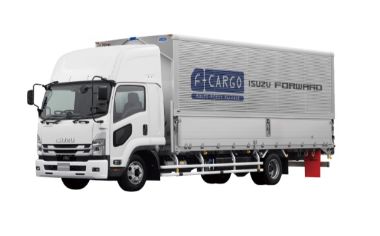 |
いすゞ フォワード いすゞ フォワードに乗っています。 |
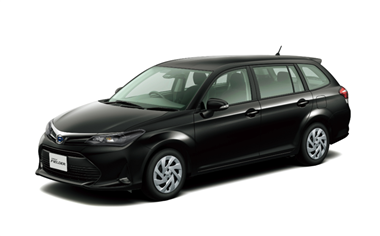 |
トヨタ カローラフィールダーハイブリッド 通勤車です |
